
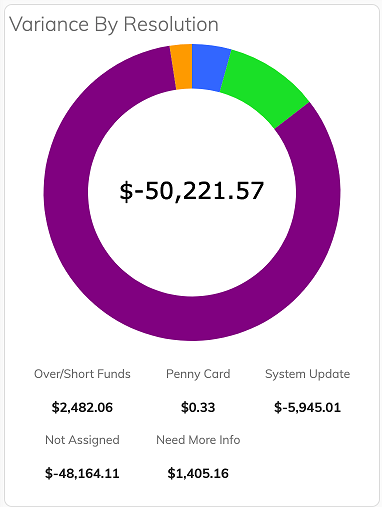
 Variance by Resolution
Variance by Resolution
Each card on the kanban board can be assigned a resolution type. Resolution type is a card attribute to identify what needs to be done to clear up the item. Because reconciling items result from comparing records in the payroll system(s) to funds held in the ledger, items are typically cleared by updating the payroll system(s) or moving money to/from the customer. Once the item is researched to try to determine the steps necessary to resolve the item, a resolution type can be assigned. Available resolution types are:
- System Update. This means that something needs to be updated in the payroll system(s).
- Over/Short Funds: This means that funds need to be moved to/from the customer.
- Need More Info: This means that you didn't have enough information to determine a resolution for the item.
- Other: This means that you determined that the resolution doesn't fall into any of the other categories available.
- Not Assigned: This is the default category when a card is created for Subledger Reconciliation Items with a dollar amount of below -$0.99 or over $0.99 and any User Reconciliation Item.
- Penny Card: This is the default category for any Subledger Reconciliation Item with a dollar amount between -$0.99 and $0.99. The number in the center of the doughnut represents the total dollar amount of all of the open cards on the kanban board. The breakdown of totals by resolution type is listed below.
© RAKE Digital Company, 2026 • Updated: 12/09/21
Comment or report problem with topic